
We Tested the Best Baby Monitors of 2026
Get through the night with less stress and more rest with the help of an audio, video or WiFi baby monitor.

By
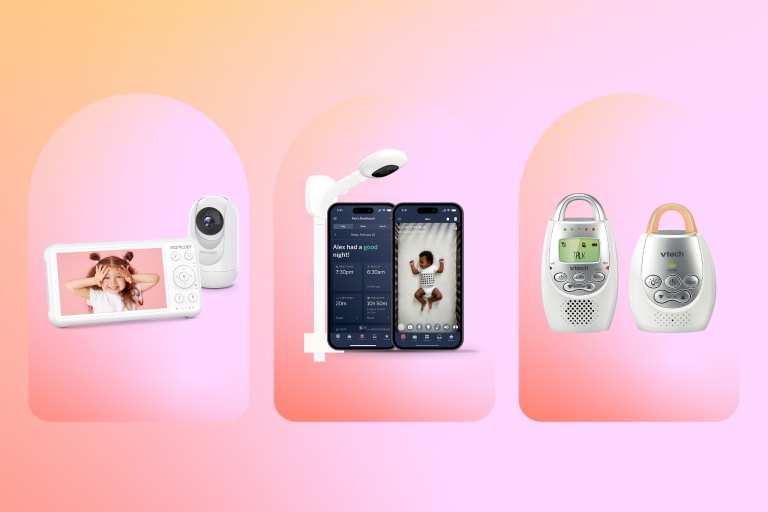
Between video monitors, WiFi options, breathing and movement monitors and audio-only choices, it's never been easier to have eyes on your baby 24/7.
Whether you want app-based convenience, a WiFi-free setup or advanced breathing tracking, there's a monitor for you. Not sure what you want? You're in the right place.
We’ve tested all types of baby monitors, spoken to sleep consultants and home security experts and sorted through feedback from thousands of parents to land on two top picks. Our best WiFi baby monitor pick is the Nanit Pro Smart Baby Monitor, and the Momcozy 1080p HD is our choice for the best video-only option.
We've also included our top picks for affordable WiFi and video options, the best wearable monitor, and a few other categories—like a WiFi + video hybrid if you want the best of both worlds, an audio monitor if minimalism is more your style and the best option for keeping an eye on multiple kids.
How We Judged the Best Baby Monitors
Best WiFi Baby Monitor

Nanit Smart Baby Monitor System with Wall Mount
From $399.00Pros
- Access live, high-def video from anywhere via your phone
- Tracks sleep, movement, breathing motion and growth
- Split-screen option for multiple kids
- Can go phone-free with home unit
Cons
- Expensive (price doesn't include annual membership fees)
- Amount of tracking information can be overwhelming
TL;DR
The Nanit Pro is the best WiFi baby monitor thanks to its excellent video quality, easy-to-use app and helpful smart features like sleep tracking and breathing-motion monitoring. It's pricey, especially with a subscription, but ideal for parents who want detailed insights and the ability to check in from anywhere.
My kids are seven years apart, and a lot changed between when I first registered for a baby monitor and when I did it again for my second. I’d heard great things about the Nanit but was hesitant about relying solely on a WiFi monitor through my phone. I decided to try it—and I’m so glad I did. Over four years in, the Nanit is one of my favorite baby products and a product I consistently recommend. I’m not alone: almost a quarter of parents in our annual Most Loved Baby Products survey said it was their favorite monitor.
“I use the Nanit every single day and it makes my life so much easier. It gives me peace of mind and that is priceless as a first-time mama,” one parent told us in our survey. “It helped an anxious mom get some sleep. I recommend it to everyone,” another said.
The Nanit Pro tracks sleep, movement, vital stats and growth with a clear 1080p HD camera, all accessible via your phone. It’s easy to set up and intuitive to use. My two favorite features are sleep tracking through the Nanit Insights app—showing daily sleep stats, something I relied on heavily over the first year to help me establish a nap and nighttime schedule—and the Breathing Wear Band, which monitors breathing motion without sensors or a sock. (It's not a medical device, and not something I used regularly, but it did provide me with peace of mind during sick days or anxious nights.)
“I did not realize how much I would love the sleep data/dashboard,” one mom told us. “We love the ‘I fell asleep x number of hours/min ago’ function and cannot imagine not having it."
I love that I’m able to check in on my little one when I’m away from home or on a work trip. (The grandparents have also been known to do their fair share of baby spying.) Other highlights include expert-backed sleep guidance, two-way audio, white noise, temperature and humidity sensors and split-screen viewing for monitoring two kids (with a second camera, sold separately). I also love the app’s background audio and picture-in-picture features; they let me keep tabs on my baby while using other apps and don't drain my phone’s battery.
And brand-new to the Nanit lineup this year: a home display. This eight-inch touchscreen functions like a parent unit on a traditional baby monitor and allows you to skip your phone altogether (great for babysitters, visiting grandparents or if you'd simply rather see baby on a larger screen at home). You can buy the home display à la carte or as part of a bundle.
Worth noting:
The Nanit is one of the most expensive baby monitors we tested, especially if you add a second camera, accessories or a subscription plan.
Nanit Insights is included for the first year, but continued access to advanced sleep analytics and other premium features requires a paid subscription.
While many parents love the sleep data and tracking features, some may find the amount of information more stressful than helpful.
Unlike a traditional video monitor, the Nanit relies on a WiFi connection for remote viewing through the app.
Additional Specs
Monitor Type: WiFi video, via smartphone; iOS and Android
Range: No limit if connected to WiFi
Power Source: Camera: electrical outlet; Phone acts as parent unit
Mount: Wall, floor stand or table stand
Best Video Baby Monitor
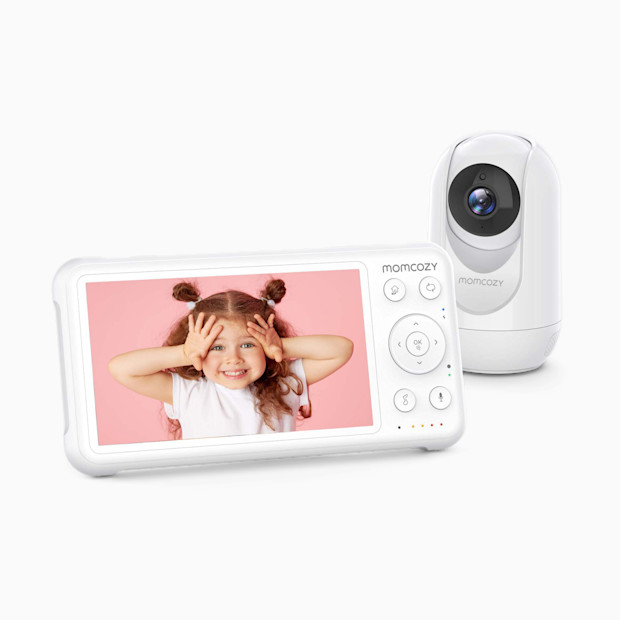
Momcozy Video Baby Monitor 1080p HD - White
From $109.99Pros
- Easy to set up, intuitive to use
- Excellent camera quality day and night
- Smooth pan, tilt and zoom
- Connects up to 4 cameras
Cons
- Some users wish volume would go up higher
- No split-screen option for multiple cameras
TL;DR
With excellent video quality, responsive controls and an easy-to-use parent unit, the Momcozy 1080p is the best non-WiFi video baby monitor. It's reliable, reasonably priced and packed with features parents actually use, making it a great choice for families who want a dedicated monitor without the complexity of an app.
In the seemingly endless sea of video baby monitors, this one stands out from the crowd. Simply put, it just works. It’s easy to set up and intuitive to use. The battery life, pan, tilt and zoom features and day + night camera quality are all 💯. And you can add up to four cameras, so you won’t have to invest in yet another monitor if or when you decide to add to your family.
“Momcozy is by far my favorite video monitor,” says Rebekah Kimminau, founder of The Baby Gear Consultant, who has tested nearly every video monitor on the market. “It stands out for its simple parent interface. The volume button is one-touch and in a great spot. The menus are super easy to navigate and the connection with the camera is immediate. The camera quality and night vision are some of the best of any non-WiFi monitors I’ve tried. And it has smooth remote rotation of the camera—there’s no delay between when you press the rotation button on the parent unit and when the camera actually moves, something that can be frustrating when using other video monitors.”
Another pro is the width of the parent unit. It’s thin—about the size of an iPhone—and fits easily in a pocket. As you move around the house toting your baby monitor with you as you go, this is a big deal. “Most other baby monitors at the same price point are kind of chunky,” explains Kimminau.
Worth noting:
Some parents wish the volume could go a bit higher, though this wasn't an issue during expert testing.
Unlike some competitors, there's no split-screen mode, so you'll need to toggle between camera views when monitoring multiple children.
If you'd like a larger screen and higher resolution, Momcozy's 5.5" Full HD Video Baby Monitor is worth considering as an upgrade.
Additional Specs:
Monitor Type: Video
Range: 960 ft
Power Source: Camera: electrical outlet; Parent unit: electrical outlet or rechargeable battery
Mount: Wall or table
Best Hybrid Baby Monitor

eufy E21 Baby Monitor with 4K Camera and Charging Base
From $259.99Pros
- Works as both a WiFi monitor and a dedicated non-WiFi video monitor
- Excellent 4K UHD video quality
- Portable camera and charging base offer uncommon flexibility
Cons
- App experience isn't as polished as dedicated WiFi monitors
- Best suited for occasional remote viewing rather than heavy app-based use
TL;DR
Can't decide between a WiFi monitor and a traditional video monitor? The Eufy E21 gives you both. It functions as a dedicated video monitor at home but can also connect to WiFi when you want to check in remotely, making it a great choice for parents who want the convenience of app access without relying on it all the time.
Many families struggle with the "to WifFi or not to WiFi" debate when they're shopping for monitors. They love the ability to check in from anywhere, share access with caregivers and receive alerts on their phone, but worry about privacy, security or simply dealing with another app in their lives. The E21 solves that dilemma. It's a hybrid monitor, so you can switch between WiFi and local monitoring as needed.
Beyond its versatility, the E21 is packed with impressive hardware. Eufy monitors are known for their crisp picture quality, and this model takes things a step further with 4K UHD resolution, excellent night vision and a huge range of motion thanks to its 330-degree pan, 60-degree tilt and 8x zoom capabilities.
The unique portability is what really sets it apart, though. The monitor includes a charging base for the parent unit, and the camera itself can operate either plugged in or on battery power—a surprisingly rare feature in the baby monitor world. Whether you're moving it between rooms, taking it to a grandparent's house or bringing it along on vacation, it offers a level of flexibility you won't find in other baby monitors.
Worth noting:
The app works well enough for occasional remote check-ins, but it isn't as polished or feature-rich as dedicated WiFi monitors like the Nanit. If you plan to rely heavily on app-based monitoring every day, a monitor designed primarily around the smartphone experience may be a better fit.
The hybrid functionality and premium hardware come at a higher price point than many traditional video monitors.
Additional Specs:
Monitor Type: WiFi + video hybrid
Range: 1,000 ft
Power Source: Camera: electrical outlet or battery; Parent unit: electrical outlet or charging station
Mount: Wall, table, crib clamp
Best More Affordable WiFi Baby Monitor
Pros
- Excellent value
- Easy setup
- Can be accessed by multiple family members at the same time
Cons
- Live audio and video feeds only work when your phone is unlocked
- Notifications feature and continuous cloud recording/storage cost an extra $19.99/year
- Cloud-based storage might not feel like the most secure option for some families
TL;DR
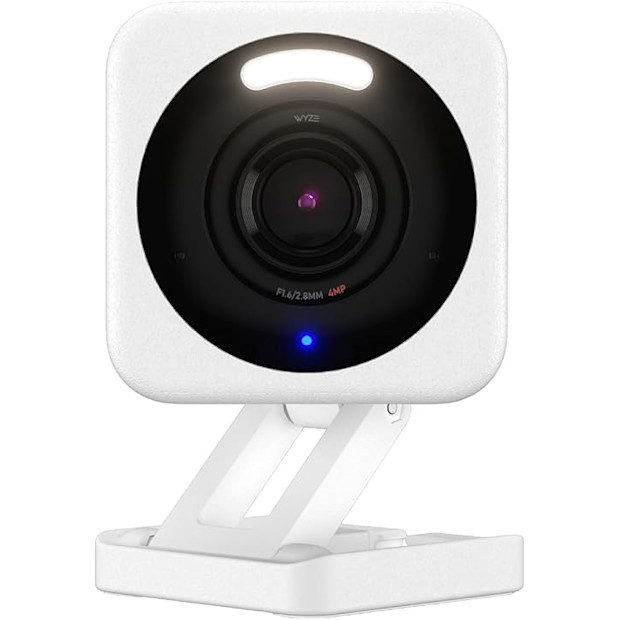
You don't need to spend hundreds of dollars to get a WiFi baby monitor. Originally designed as a home security camera, the Wyze Cam v4 offers HD video, remote viewing, two-way audio and motion alerts at a fraction of the cost of dedicated baby monitors, making it a great budget-friendly option.
Leave it to enterprising parents to find a hack for everything. The Wyze, originally designed as a home surveillance camera, is used by tons of parents as a baby monitor. And with its easy setup, live HD streaming and incredibly affordable price tag, it’s a great choice if you’re looking for a WiFi option at a fraction of the cost of the Nanit. “Why buy an expensive camera when a cheap Wyze camera does it all?” asked one Babylist parent.
The Wyze is controlled remotely via an app and can be shared by multiple family members. When used as a baby monitor, you can view the live stream in real-time or set up push notifications to alert you to motion and sound. (You can also adjust the sensitivities on these so you’re not being bombarded with a message every time your little one makes a move.) The camera has color night vision, simultaneous two-way audio and can pan, tilt and zoom. “I am able to peek at my boy from out of the house with both a visual and sound,” another parent told us. “It has excellent night vision since it is technically a security camera.”
You'll get free live streaming, motion detection and short cloud-stored video clips right out of the box with the Wyze; however, to access advanced features like continuous cloud recording and storage, a subscription to Wyze Cam Plus is required for $2.99/month or $29.99 per year.
Worth noting:
Unlike many baby-specific monitors, the Wyze doesn't offer background audio, so live audio and video feeds only work when your phone is unlocked and the app is open.
Features like continuous cloud recording and extended video storage require a Wyze Cam Plus subscription ($29.99/year or $2.99/month).
If multiple caregivers need access, they'll need to download the app and be granted permission to view the camera.
Some parents may have concerns about cloud-based video storage and connected-device security. Local storage via a microSD card is available as an alternative.
In 2023, Wyze reported an incident in which a small number of users viewing cameras through a web browser briefly saw feeds belonging to other users. The company addressed the issue, but we recommend contacting Wyze directly if you have any concerns about your monitor’s security.
Additional Specs
Monitor Type: WiFi video, via smart phone; iOS and Android
Range: No limit if connected to WiFi
Power Source: Camera: electrical outlet; Phone acts as parent unit
Mount: Wall or table
Best More Affordable Video Baby Monitor
Pros
- Good value
- Can pan, tilt and zoom
- Large display; good camera quality for price
Cons
- Battery life may fade over time
- Some users wish volume would go up higher
TL;DR
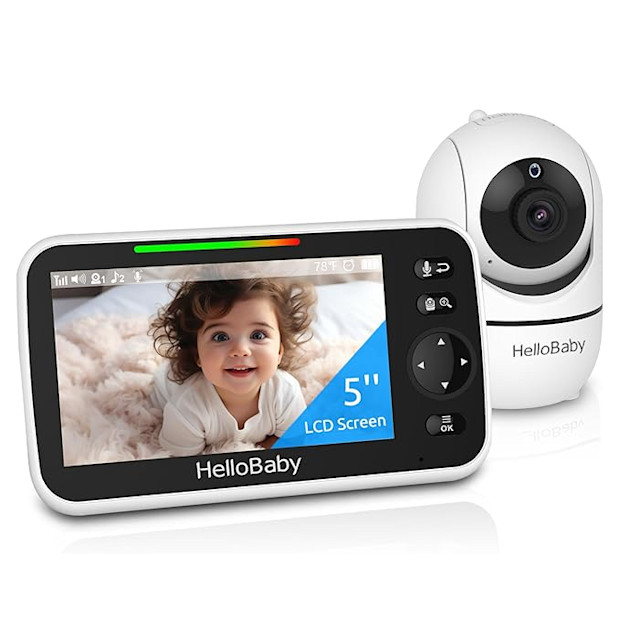
The HelloBaby HB6550 is an affordable, no-frills video monitor that delivers where it matters most: a clear picture, easy setup and reliable performance. It's a great choice for families who want a dedicated video monitor without spending a lot.
Finding a reliable video monitor at a reasonable price can be challenging. This easy-to-use video-only monitor from Hello Baby is an affordable pick loved by thousands of parents for its price, features and functionality.
The two standout features of this baby monitor are ease of use and camera quality, both extra impressive considering the monitor’s price point. The user interface is straightforward and intuitive. (Many parents specifically call out that it’s especially grandparent-friendly.) The five-inch display offers a clear view of baby both during the day and at night, and the camera features a wide pan and tilt range and 2x zoom.
“I ended up liking this simple Hello Baby monitor more than the Eufy or other fancy WiFi monitors,” one parent said in our survey. “It’s easy to set up, use and even pack for travel,” added another.
Other perks include two-way audio, room temperature monitoring, built-in lullabies and an audio-only power-saving mode, all adding great value at this price.
Worth noting:
While battery life is generally solid, some parents report that the rechargeable parent unit's battery performance declines over time—a common issue with lower-priced video monitors.
Some users wish the volume could go higher, particularly in larger homes or noisier environments.
Video quality is impressive for the price, but it isn't as sharp or feature-packed as premium options.
This monitor focuses on simplicity rather than advanced features, so you won't find app connectivity, remote viewing or smart sleep-tracking tools here.
Additional Specs:
Monitor Type: Video
Range: 1,000 ft
Power Source: Camera: electrical outlet; Parent unit: electrical outlet or rechargeable battery
Mount: Wall or table
Best Wearable Baby Monitor
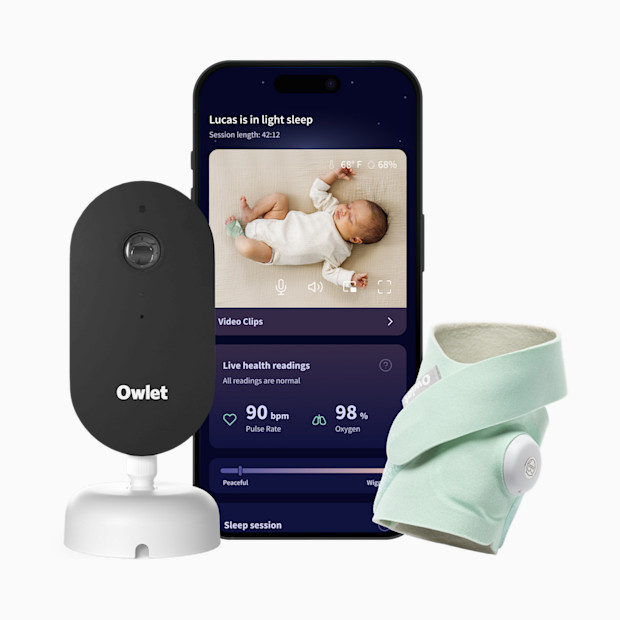
Owlet Dream Duo (Gen 3) Smart Baby Monitoring Bundle - Mint
From $379.99Pros
- Wearable vitals tracker + WiFi video monitor in one system
- Tracks heart rate, oxygen level & sleep trends
- Free personalized sleep program for baby
Cons
- Dream Sock connectivity can be inconsistent
- App and camera occasionally can be glitchy
- May increase anxiety for some parents rather than ease it
TL;DR
The Owlet Dream Duo combines a wearable Dream Sock with a WiFi video monitor, giving parents access to real-time pulse rate and oxygen monitoring, sleep tracking and HD video all in one app. While connectivity issues occur from time to time, many parents find the added data and peace of mind well worth the tradeoff, especially during the newborn months.
Owlet helped pioneer the wearable baby monitor category, and it's still one of the most recognizable (and most popular) brands in the space. The system pairs a WiFi camera with the FDA-cleared Dream Sock, a wearable sensor that slips onto your baby's foot and monitors pulse rate and oxygen levels while they sleep. (If you’re curious what “FDA-cleared” actually means, this FDA-approved vs. FDA-cleared explainer breaks it down.) The sock also tracks sleep metrics like total sleep time, wakings and sleep quality, all through the Owlet Dream app.
While the user experience has steadily improved over the years (this current iteration is Gen 3), reviews on the Owlet are still mixed. That's because there's a bit of a gap between the value of what the monitor offers and how it often delivers.
"The best part of using the Owlet is the heart rate and oxygen level monitoring," shared one of our testers. "I truly can’t imagine not having that feature, and I plan to use the Dream Sock until it no longer fits my baby," she said. "The peace of mind the Owlet gave me while sleeping was incomparable," noted another new parent.
But on the flip side, there's often a lot of glitching to deal with. "I experience daily issues with the Dream Sock connection," the same tester shared. "The sock loses connection a few times a week, even when our Wi-Fi shows as “good” or “fair.” When the Dream Sock is attached and we take our baby to the next room, the alarm goes off. We’ve tried moving the Dream Sock base to a different location in our room, but it hasn’t made a difference," she said. "It malfunctioned a lot and caused unnecessary stress,” added another. So who should you believe?
If you’re the type of parent who is comforted by more information rather than less, we think the Owlet is a great choice. It does have connectivity glitches, though they've improved greatly over time and don't seem to show up for every user. Many parents value the peace of mind the Owlet provides and especially lean on the vitals data when their little one is a newborn or when they’re sick, or if they're dealing with postpartum anxiety. For other parents, though, the Owlet can actually cause added anxiety rather than relieve it. It often depends on your disposition and personal preferences.
This bundle includes the Dream Sock sensor, 2K HD camera, four fabric socks (fitting babies one to 18 months and six to 30 pounds), a base, a wall mounting kit, and cable guards. You'll also get free access to the Owlet Dream App, which includes basic monitoring functions; you'll need a paid subscription to unlock more detailed data like insights and trends.
Worth noting:
One thing to remember when using the Owlet is that if you ever have any concerns about your baby’s health, your pediatrician should always be your first source of information.
You should also never use it to monitor your baby if they fall asleep in an unsafe sleep situation like a lounger or with loose blankets nearby; instead, move them to a firm, flat surface free of soft objects and loose bedding.
Many parents note that the night vision on the camera could be clearer.
Additional Specs
Monitor Type: WiFi video, via smartphone
Range: Sock: about 100 feet; Monitor: no limit if connected to WiFi
Power Source: Camera: electrical outlet; Sock: rechargeable base; phone acts as parent unit
Mount: Wall or table
Best Baby Monitor for Multiple Kids
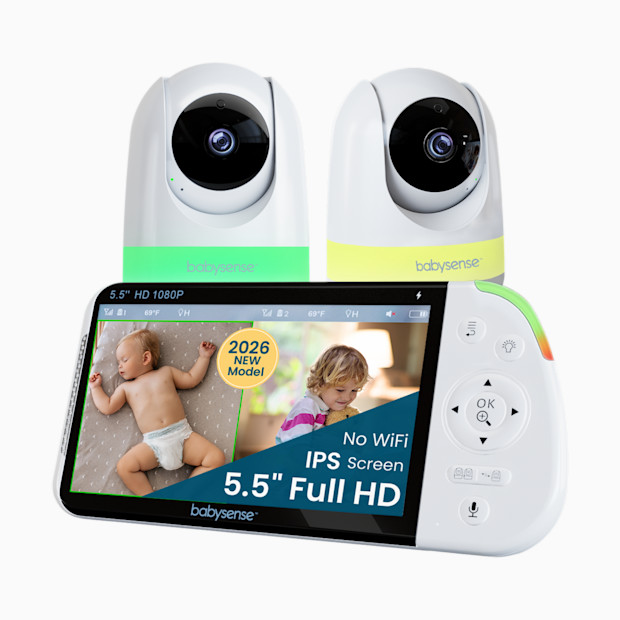
Babysense Babysense PRO 1080p Full HD Split-Screen Baby Monitor - 2 Cameras
From $159.99Pros
- Includes 2 cameras and split-screen view monitor
- 360-degree view
- Can support up to 4 cameras
Cons
- Audio only works for one camera at a time
- Lowest brightness and volume settings still too high for many users
- Lullabies sound a bit tinny
TL;DR
The Babysense Split-Screen Video Baby Monitor is our favorite option for monitoring multiple kids thanks to its true split-screen viewing, excellent video quality and responsive controls. It comes with two cameras, delivers a clear picture day and night and makes it easy to keep an eye on two rooms at once without constantly toggling between screens.
There are plenty of video monitors that let you view two rooms simultaneously, but the Babysense Full HD makes it even easier with its split-screen technology. Instead of toggling between two separate screens, this monitor splits the screen in half, giving you a view of both spaces at once. It’s a great feature to have if you have twins or multiple kids close in age, but is just as useful if you want to keep an eye on two separate spaces (a nursery and a playroom, for example).
“When we had our third baby and our kids were in separate rooms, we got the Babysense dual monitor and I loved the big screen display,” Rachael Shephard-Ohta, a sleep consultant, Certified Lactation Counselor and founder of Hey Sleepy Baby, told us.
The camera quality on the Babysense is another feature parents consistently rave about. The picture is crisp and clear, even in night mode, and the 5.5” LCD display makes it easy to take it all in. There’s a 360-degree pan along with a tilt and zoom feature. And unlike some monitors, where you’ll experience scrolling lag, you won’t find that here—the buttons are really responsive, and it’s easy to pan a room quickly. There’s also a night light, two-way audio, built-in lullabies and white noise and a 12-hour battery life.
This version includes two cameras, but if you only need one (or plan to add a second camera later on), there’s a single-camera version, too. You can also add two more cameras to this unit if you need to keep an eye on more children. (The screen will toggle between each pair of cameras.)
Worth noting:
In February 2026, Babysense recalled a previous version of their baby monitor models, the Max View, due to a fire hazard. This model is not affected or included.
While the monitor can support up to four cameras, split-screen mode displays only two camera feeds at a time; adding more cameras causes the screen to rotate between views.
The parent unit is larger than some competing monitors, which is great for viewing but less pocket-friendly.
Additional Specs
Monitor Type: Video
Range: 1,000 feet
Power Source: Audio base: electrical outlet; Parent unit: electrical outlet or battery
Mount: Wall or table
Best Audio Baby Monitor
Pros
- Very affordable
- Filters out background noise (like fan or white noise machine)
- Travel-friendly
Cons
- Audio only, no video
TL;DR
Affordable, reliable and easy to use, the audio-only VTech DM221 picks up even quiet sounds without the constant background static common on some audio monitors, making it a great choice for travel, everyday use or parents who prefer a simpler way to monitor their baby.
Don’t discount the value and usefulness of an audio-only monitor. Audio monitors are affordable, functional and portable. They can also be a lifesaver for anxious parents who are overwhelmed by the thought of being glued to a video monitor screen trying to keep an eye on their baby 24/7.
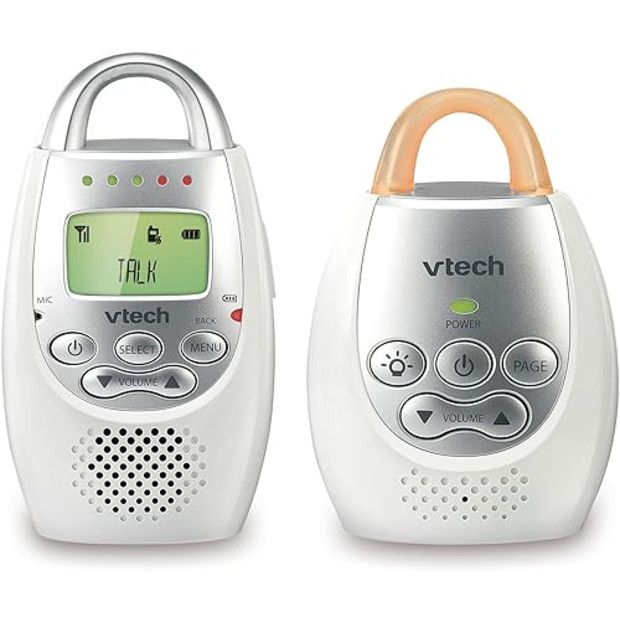
This VTech monitor has all the features you need in an audio-only monitor. It picks up the quietest of sounds very well, but won’t emit the constant (and annoying) white noise you often hear from other audio monitors. It features a two-way intercom, especially useful during the toddler years, and a visual five-level sound indicator on the parent unit so you can visually monitor the noise level even when the unit is muted. (The baby unit also features a dimmable light.) It’s small and portable, and the price tag is really easy on your wallet. Many parents use it for travel, but if you do prefer an audio-only monitor, it’s a great option for everyday use at home, too.
Worth noting:
This is an audio-only monitor, so there's no video feed or app connectivity.
Additional Specs:
Monitor Type: Audio
Range: 1,000 ft
Power Source: Audio base: electrical outlet or battery; Parent unit: electrical outlet or battery
Mount: Table or hook
Why Trust Babylist?
Babylist is the expert in baby; we know baby gear inside and out. We talk with parents face-to-face in our showroom and on our user panels and hear from thousands annually via our Best Baby Products online survey. We know what items millions of expecting parents are adding to their baby registries.
Firsthand professional and personal experience. I’ve been using baby monitors on and off for the last decade, both in my role as Babylist’s gear editor and as a mom of two boys, a middle schooler and a preschooler. I’ve tried them all: simple audio monitors, countless video monitors, several WiFi options with vitals tracking, and a few hybrid options, too. I used this personal and professional experience when making my picks for this guide.
Expert POV. For an expert perspective, I spoke to Rachael Shephard-Ohta, a sleep consultant and Certified Lactation Counselor and the founder of Hey Sleepy Baby. I also talked to Kurt Sanger, a cybersecurity expert at Batten Safe Corporation, about keeping your baby monitor secure.
Baby monitor data. I regularly analyze which baby products our users are adding to their baby registries the most (and which ones they aren’t) and what our team of Merchandising experts—our buyers who are responsible for ensuring the Babylist Shop is stocked with the best and newest gear—is excited about. Studying this kind of data helped us choose which baby monitors to narrow in on and which ones to recommend to new and expecting parents.
Feedback and reviews. I reviewed comments and feedback from Babylist’s annual product survey of thousands of Babylist parents, read customer reviews from hundreds of Babylist users and spoke to parents on our Babylist staff about their real-life product experiences.
Do You Need a Baby Monitor?
Most parents don't need a baby monitor if they're room-sharing or living in a small space, though many still find one useful for tracking sleep analytics, room temperature or vitals. If your baby sleeps in a separate room, a monitor is worth having. It lets you relax, watch Netflix or actually get something done while your baby sleeps, without sprinting to the nursery every 20 minutes. A video monitor can also double as a nanny cam when you're away from home.
“A baby monitor is a great tool for parents who aren't room sharing,” says Rachael Shephard-Ohta, a sleep consultant and Certified Lactation Counselor and the founder of Hey Sleepy Baby. “If your baby is in a nursery, a monitor is a good idea so that you can be sure you're hearing baby's cries. Some parents love the peace of mind that comes with being able to check in on their babies during nap times or overnight,” she explains.
What Are the Different Types of Baby Monitors?
There are four types of baby monitors: audio monitors, video monitors (WiFi, non-Wifi and hybrid) and baby movement monitors.
Audio monitors transmit via radio frequency and offer sound only. They don't have a video screen and don't require an internet connection—just plug in and go. They're the most basic and affordable monitor option, and a solid choice for families who don't need video. Many parents pick one up as a travel monitor or to keep at a grandparent's house.
Video monitors are the most popular choice. They come with features like large screens, night vision and zoom, and range in price from about $50 to $400. There are three sub-types:
Traditional monitors include a camera and a dedicated parent unit (the handheld screen). The parent unit works wirelessly but must stay within range of the camera.
WiFi monitors use your smartphone as the screen and can be viewed from anywhere you have service, a big plus if you work away from home or travel frequently. Note that caregivers (nannies, grandparents, babysitters) will need to be added as approved users in the monitor's app. Most allow a set number of additions before charging for more.
Hybrid monitors offer both options: use the dedicated parent unit at home or switch to your phone when you're out.
Baby movement monitors track your baby's movements and, in some cases, vitals like breathing, heart rate, and oxygen saturation. Some use wearables (a sock or band); others use sensors that go under the crib mattress. Many pair with a video monitor and are sold as a bundle, which makes them the most expensive category.
One important note: movement monitors are not medical devices. According to the American Academy of Pediatrics, they provide little to no protection against Sudden Infant Death Syndrome (SIDS). Always follow safe sleep practices regardless of which monitor you choose.
What Should You Look for in a Baby Monitor?
Choosing a baby monitor comes down to your home setup, budget and what would actually give you peace of mind. Here's what to consider:
Monitor type: Audio monitors are basic and affordable. Video monitors offer more peace of mind. WiFi monitors are the most flexible if you're frequently away from home. There's no wrong answer; it depends on your lifestyle and what features and options you think will work best for you.
Range: For non-WiFi monitors, check the effective range, especially in older or multi-story homes. WiFi monitors depend on a strong, secure internet connection.
Portability and mounting: Consider where and how you’ll mount the camera. Choose a setup that’s portable and safe, at least six feet from the crib. “This is for safety and is to ensure that your baby can't grab at the monitor or any associated cords. Most modern monitors will give you a nice, clear picture even if not directly in front of baby's crib, so always err on the side of caution and be sure it's well out of reach,” recommends Shephard-Ohta.
Display quality and screen size: Larger screens and higher resolution = a clearer image. WiFi monitors use your phone as the display.
Two-way communication: This feature lets you talk to your baby over the monitor. It’s not as useful during the baby days, but comes in handy in toddlerhood and beyond.
Battery life: This determines how long you can carry the parent unit around before it needs to charge.
Remote pan, tilt and zoom: The ability to adjust the camera's view remotely is a nice-to-have, especially as your baby starts moving around.
Wireless encryption: If you choose a WiFi monitor, secure your home network, keep the monitor's firmware updated and go beyond the manufacturer's defaults. "You can eliminate a lot of risk by just doing the bare minimum," says Kurt Sanger, cybersecurity expert at Batten Safe Corporation. This includes changing factory passwords and enabling multifactor authentication if available. For non-WiFi monitors, look for a 2.4 GHz FHSS wireless transmission.
Specialized features: Some monitors track sleep patterns, breathing and room temperature. Decide if these extras are worth it to you before paying for them.
Frequently Asked Questions
Can you use an HSA or FSA account to buy a baby monitor?
Yes, some baby monitors are HSA/FSA eligible because they are considered health and safety-related devices. Check with your insurance provider before you purchase a baby monitor for details on your specific plan.
Do I need a WiFi baby monitor?
You don’t need a WiFi baby monitor, but whether or not you want one is a matter of personal preference. Some parents like the convenience a WiFi baby monitor provides and that they’re able to view their little one on their smartphone from anywhere. Other parents don’t want to rely on WiFi (or their smartphone) to monitor their baby, and prefer a video or audio monitor instead. Some parents also have security concerns around WiFi-enabled baby monitors.
Which baby monitor has the best range?
Most audio or non-WiFi video baby monitors have a range of anywhere from a few hundred to about 1,000 feet. A baby monitor’s range will also depend on where you’re using it (in an old house or apartment with thick plaster walls? In a newer home with a more open floorplan? Outdoors?), as this can affect transmission. WiFi-enabled baby monitors have unlimited range as long as you have a strong internet connection.
